Dev’s notes: how this wedding site was built
Some notes on how I put our wedding site together, for anyone curious, and for the engineers among our guests who might want the nerdier details.
Why build it instead of using WithJoy?
Honestly, the hosted wedding sites are fine. But there were a few things we wanted that I doubt any of them would ever offer:
- An opening that is our actual printed invitation: Jess’s envelope, card and lilies, split into layers that move with your mouse or finger.
- An invite that turns into a guide on the day: your table, who you’re sitting with, the menu, and what’s on now and next.
- One link for a whole group chat, where everyone taps their own name to get to their own invitation.
- A wedding ticket with your name and a QR code back to your invite, made right on your phone, to keep in your photos.
- Meal choices that open after our menu tasting, with a ping on Telegram, email or phone when they do.
- Seating that splits families across tables when it needs to, and a site that holds up when 150 people open it at once on the venue wifi.
I also didn’t love the idea of our guests’ details sitting on some platform. And I’m an engineer, so of course I was going to build it.
The design is Jess’s
Credit where it’s due: everything that looks good here was designed by Jess, my bride. She did the invitation and the website’s look in Canva (the envelope, the lace card, the colours, the scrapbook pages, the fonts) and I turned her designs into code. If something looks off, that’s probably me getting a margin wrong, not her.
The stack
- Framework
- Next.js 16 (App Router, React Server Components), React 19, TypeScript
- Styling & motion
- Tailwind CSS 4, framer-motion
- Hosting
- Cloudflare Workers via the OpenNext adapter
- Database
- Cloudflare D1 (SQLite) through Prisma 6’s D1 driver adapter
- Media
- Cloudflare R2: resized photos from a custom domain, gallery originals in a private bucket
- Photos & maps
- PhotoSwipe 5 for the gallery viewer, Leaflet for the venue map (both load only when you tap)
- Abuse protection
- Workers Rate Limiting bindings
- Tests
- Vitest + Testing Library on a throwaway SQLite database
Architecture
I don’t run any servers for this. It’s one Cloudflare Worker running the Next.js app, plus a SQLite database (D1) for guests, RSVPs and settings, two storage buckets (R2) for photos, and a few rate limiters. One bucket is public and holds the resized photos you see; the other is private and keeps the gallery’s originals, which only the admin can get at. All of it lives on Cloudflare, close to whoever is opening the page.
Rendering & data loading
The pages are React Server Components. The invite is put together on the server, and your browser only has to wake up the parts you actually interact with: the envelope, the RSVP form and the ticket. I tried to keep database trips to a minimum. All the site settings come back in one query that’s shared for the whole request (React’s cache()), and anything that doesn’t depend on something else runs in parallel.
Your invite link is either a private token or a readable slug like your name. I only store a SHA-256 hash of each token, so even if the database leaked, the links in it wouldn’t work.
The database, and living without transactions
D1 is SQLite on Cloudflare’s network, which is lovely and fast. What I didn’t know going in is that Prisma’s D1 adapter quietly ignores transactions. Every query just runs on its own. So I had to design the writes around that.
For schema changes I write a Prisma migration (the tests use it) and a small numbered SQL file that I run against D1 by hand. I only ever add things first and clean up later, so I can update the live database before the new code goes out and nothing breaks in between.
How the data fits together
The whole wedding fits in twelve tables, and most of them hang off one idea: an invite goes to a household, not to one person. So the main table, Invitee, is the household, with one invite and one RSVP. The people in it are InviteeMember rows, and each person answers for themselves: coming, not coming, or hasn’t said yet (an empty value, which isn’t the same as a no). Dietary needs and meals sit on that row too.
I never type in how many people a household can bring: it’s the number of members, plus one if they’re allowed a plus-one. Plus-ones don’t get a row of their own (they’re whoever you bring), so their name, dietary needs and meals live on the household’s RSVP.
Every household also has a slug, the readable end of the link, usually made from its name. I can also hand out a private link, the hashed token from earlier, which I can revoke or set to expire. Both open the same invite. Early on, searching for your name minted a new private link every time, and I ended up with hundreds of them lying around. Now the search hands out your slug, and one button revokes every private link. None of those old ones work any more.
Slugs are readable, so I treat them as public, which is why the invite page never shows anything private. If you left a phone number for meal updates, your invite only shows a masked version of it and the fact that it’s saved.
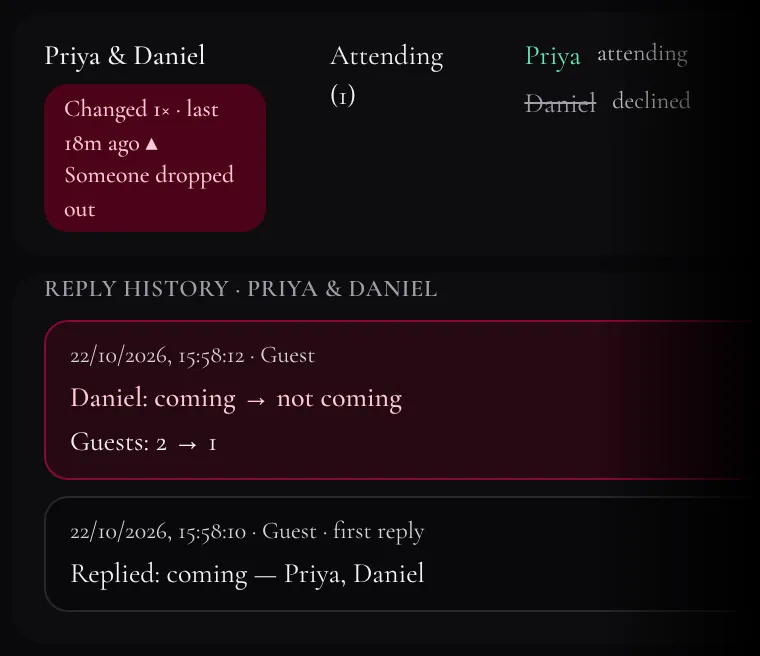
Every change to a reply gets written down in RsvpChange, whether you made it or I did, so we can spot a household that changed their mind or dropped out. The private bits (your contact, notes and dietary needs) are only ever recorded as “changed” or “cleared”, never copied in.
Seats are one row per person (more on why in “On the day”), pointing at either a household member or a household’s plus-one. A table is allowed to go over its size; the admin just warns me.
Everything that isn’t a guest (the date, the venue, our story, the section photos, colours, fonts, the timeline and the menu) is one key/value table, SiteSetting, instead of a column per setting. A new setting never needs a database change, and we can change almost anything on the site from the admin without me deploying code.
Caching
Static files get a hash in their filename and a_headers rule that lets Cloudflare cache them for a year as immutable. A new build means new filenames, so nobody gets stuck with old artwork. Photos I upload, gallery ones included, go into R2 with unique names and the same year-long caching. They load straight from R2’s own domain, so a page full of photos never touches the Worker.
The pages themselves I chose not to cache. When you RSVP, or when I change something in the admin, I want it to show up straight away, and the database is close enough that it’s quick anyway.
The envelope
Jess designed the opening in Canva, and the SVG export was 8 MB (base64 PNGs and nested masks everywhere). I wrote a little script that splits it into layers, renders each layer in headless Chrome into a tightly cropped WebP, and spits out a TypeScript file with where each layer goes.
On the page, each layer moves a different amount as you move your mouse or drag your finger, smoothed out with springs. Only the backdrop, envelope and card load up front. The rest trickle in while the intro plays, and the invite underneath waits until the browser has nothing better to do, so its photos don’t slow the envelope down. If you’ve turned on reduced motion, you just get a simple fade.
Photos & the wedding ticket
When I upload photos in the admin, they’re resized in my browser to WebP (2400 px max) and go straight into R2. The ticket you can save is drawn into a PNG on your own phone, QR code included, so your personal link never gets sent to some QR code website. The photo gallery has its own section, next.
The photo gallery
Jess designed the gallery as its own page, so that’s what it is: each invite has a Photos page, linked from the menu and from the end of Our Story. I measured the layout straight off her Canva file: rows about 56% as tall as they are wide, 30 px mats, and a dark plum #290f17 band under the first photo.
We’ll keep adding photos, so the layout can’t be hand-placed. It’s built from each photo’s shape instead: wide photos run across the page, and runs of portraits become pairs (one of them in a mat) and trios on a coloured band. A portrait only ever sits on its own when it has no neighbours, and the mat swaps sides from one pair to the next, as in the design. Photos are in file-name order, so to reorder them I just rename files.
The frames were the fun part. Jess picked a colour for each one from its photo: olive for the forest shoot, maroon for the red doors. So when a photo is added, my browser shrinks it to 48×48 pixels and finds the strongest hue among the colourful pixels (ignoring near-black, near-white and grey ones), then deepens it into a mat. Bright, mostly white photos get cream instead, like the design’s railing shots.
Our photographer’s originals live in a private bucket with no public address, so guests can’t download them. Workers can’t resize images, so my browser does it when I add photos: it makes three WebP sizes of each (about 960, 1600 and 3000 px), and only those are public. I tested it with the 49-megapixel originals that were embedded in Jess’s design file. I can also drop photos straight into the bucket from the Cloudflare dashboard. The next time I open the admin page, it makes their sizes and colours, and removes any I deleted there.
The page itself only ever uses the two smaller sizes. Tap a photo and it opens in PhotoSwipe, which is only downloaded at that moment. It shows the 1600 px version, and the 3000 px one loads only once you zoom in. That took a small trick: on a sharp screen the browser happily grabs the biggest size straight away, so the viewer tells it the photo is smaller until you actually zoom. Opening a photo also adds a step to your browser history, so the back button on an Android phone closes the photo instead of leaving the page. It works even if you press back while the photo is still zooming open.
Built for phones
Almost everyone is going to open this on their phone, from a chat. The body font, Cormorant Garamond, is gorgeous but runs small, and Tailwind’s normal sizes looked tiny on a phone. I didn’t want to go through every component bumping sizes, so the guest pages have an invite-type class that redefines Tailwind 4’s size variables (--text-sm, --text-base and friends) on small screens. Every text-sm gets a bit bigger on phones, desktop stays the way Jess designed it, and the admin isn’t touched. It took me a while to figure out why it did nothing at first: inside @layer utilities, Tailwind drops a class nobody uses directly.
The yes/no and “notify me by” switches are really just radio buttons underneath, so keyboards and screen readers still work. The little pill slides between options with framer-motion’s layoutId, and just jumps if you’ve asked for less motion. Before anything ships I check it in headless Chromium at phone size.
Friend groups & bulk edits
Some invites go to a whole group chat at once, so a friend group gets one link, /group/<slug>, listing everyone in it. You tap your own name and land on your own invitation. People can be in more than one group (uni friends and work friends overlap more than you’d think), so it’s a many-to-many table. The page shows names, so search engines are told to stay away.
In the admin I can tick a bunch of invitees and change them all at once: add them to a group, give them a plus-one, delete them. Because of the no-transactions thing, a bulk action checks every invitee first and only starts writing once they all pass. If one of them has a problem, nothing changes. Groups can also come in from the guest list spreadsheet.
The admin side
I’ve mentioned the admin a lot by now. It’s how we run the whole thing: guests, replies, seating, photos, and most of the words and colours on the site. It’s one password, and it works on my phone as well as my laptop.
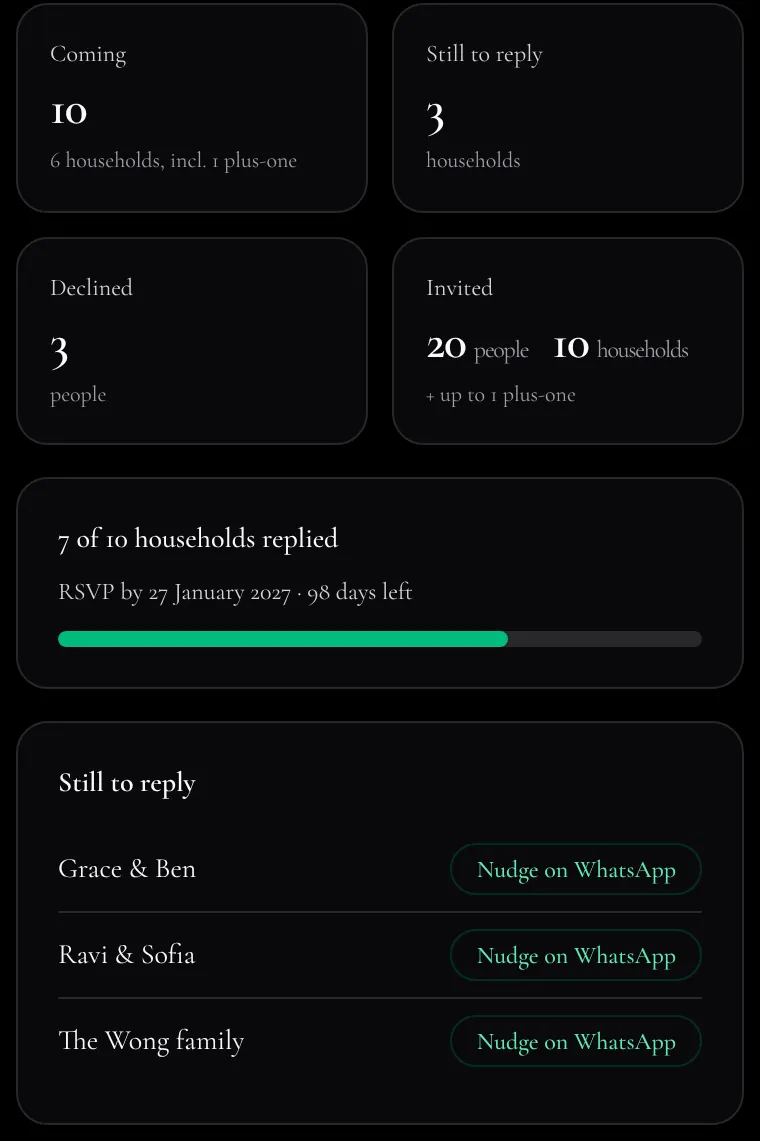
- Dashboard
- Who’s coming, who hasn’t replied (with a WhatsApp nudge for each), how long until the RSVP deadline, and the latest replies
- Invitees
- Households, their members and plus-ones, their links, and share buttons with a ready-made message
- Groups
- Friend groups and their shared links
- Seating
- Tables, and who sits where
- Gallery
- The photo gallery: upload, pick a cover, delete
- Import
- The guest list from a spreadsheet: households, members, groups and seats
- RSVPs
- Everyone’s answers, person by person, with a badge when a household changes their reply (red if someone goes from coming to not coming), and a spreadsheet export
- Settings
- Everything else, in twelve tabs
Every admin page and every one of its couple of dozen APIs checks the signed cookie, and the APIs refuse requests sent from any other website. Signing out on one device signs out all of them.
The guest list can come in from a spreadsheet. Like the bulk edits, the import checks everything before it writes anything:
On the settings page nothing saves the moment you touch it. A bar at the bottom counts what’s unsaved, and Review lays it out against what’s live, like below. Only what actually changed gets sent. That last part started as a fix: saving used to rewrite all sixty or so settings every time, and on D1 that was slow enough to time out (it’s the footnote on the transactions whiteboard, back in the database section).
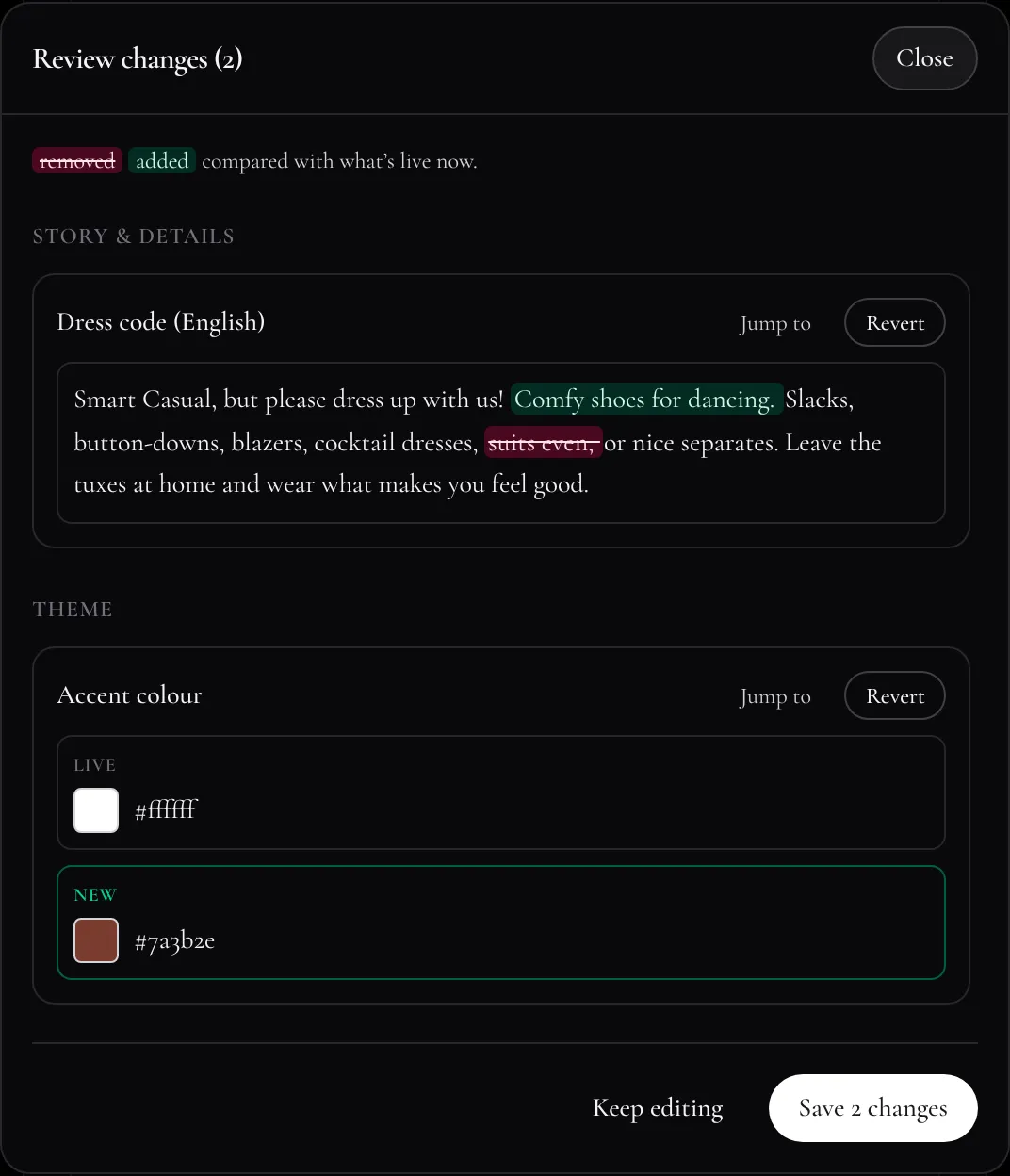
Fonts used to be a text box. Get a name slightly wrong and the browser would quietly fall back to a generic font, which for a script font on Windows meant Comic Sans. Now it’s a list of fonts we host ourselves, each previewed in its own lettering, and a custom name gets checked against Google Fonts before it saves. Colours got their own sliders, because the built-in colour picker on some phones doesn’t open at the colour you already have.
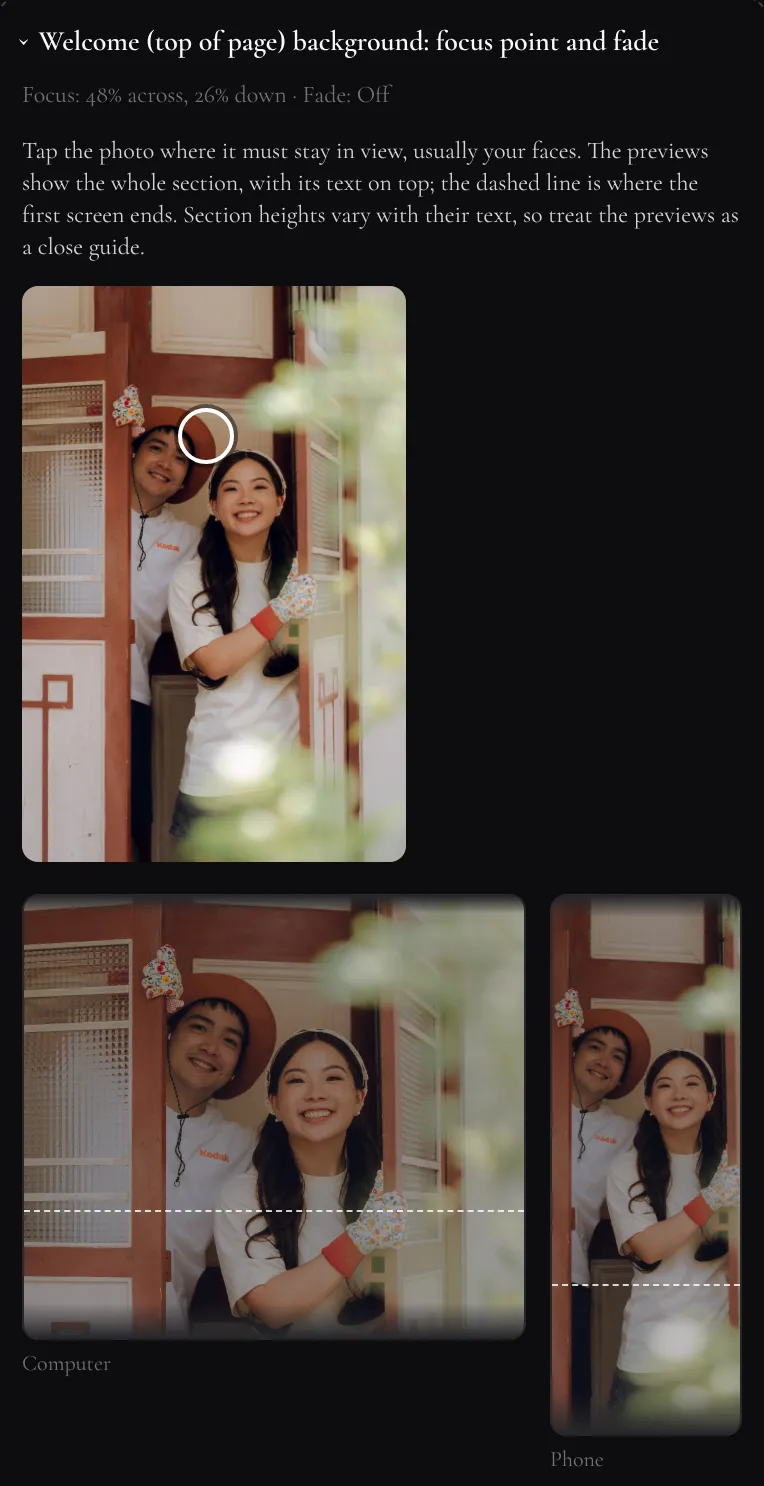
Header and background photos get a focus point. The photo at the top of the invite cut our faces off on a computer, because a wide screen crops a photo very differently from a tall one. So in the admin I tap where our faces are, and the site keeps that spot in view on both.
On the day: 150 phones, one wifi
On the wedding day your invite turns into a little guide: your table, who you’re sitting with, the programme and the menu. I designed it around one moment. Someone at the mic says “open your guide to find your table”, and around 150 people do it at the same time, most of them on the venue wifi. To my server, that’s all one IP address.
So the rate limits are set for a whole room (120 to 600 requests a minute per address), and there’s a test that fails if I ever lower them. “Find a table” searches a list that comes with the page, so typing doesn’t hit the server at all. The “now” and “next” in the programme come from your phone’s clock instead of refreshing every few seconds. 150 phones polling my server would be a pretty silly way to take down my own wedding.
Seating is per person, not per household, because families get split up across tables all the time. Each table can have its own name and size, and the seating plan can come in from the same spreadsheet as the guest list.
Little details
The “Our Story” heading writes itself in, one word at a time. That broke in Chinese at first. There are no spaces, so the whole heading counted as one word, refused to wrap, and ran right off the card. Now text without spaces goes one character at a time.
Each section has one big photo, which fades into the colour behind the story card. For a while I could see a faint line where the two met on some phones. I ended up taking screenshots and checking the pixel values to find it. The film grain was only on the colour band and not on the photo, so the band was one shade lighter. Now the grain covers the whole section and every edge fades out.
The little icon in your browser tab is cut out from our couple illustration. The file I had was a JPG with a grey and white checkerboard painted in to look transparent, so I had to strip that out by colour before shrinking it down.
Privacy & abuse protection
Looking up guests, sending RSVPs and logging in to the admin are all rate limited with Cloudflare’s rate-limiting bindings, based on your real IP. The admin uses a signed cookie that’s checked on every admin page and API. CSV exports are protected against spreadsheet formula tricks. The image proxy the ticket uses only fetches from this site’s own hosts, the gallery’s original photos are only ever handed to the admin, and the demo invitation can’t save anything. Even the “back” links on this page only go to a short list of pages on this site, so nobody can use them to send you somewhere else.
Developing locally
When I run npm run dev on my laptop, it talks to the real database and storage through Wrangler’s remote bindings, so I see exactly what guests see. That also means any change I make locally is real, so I try to be careful. For example, the demo invitation used to create a demo guest whenever I opened it locally, which meant a working, guessable invite on the live site that counted in our RSVP numbers. Now the demo household is built into the code and never reads or writes guest data. The tests use a fresh SQLite database that’s rebuilt every run.
Two shortcuts I added for myself while testing: put ?gateway=off on an invite link to skip the envelope (after watching it open for the hundredth time), and the “back” link here takes you back to where you were without playing it again.
Thanks for reading, and see you at the wedding.
Designed by Jess, built by Zhao Cong, who probably should have been helping plan the wedding instead · Say hi on LinkedIn